



On Wednesday, Instagram began rolling out a feature called “Your Algorithm” in the U.S., an AI-powered control panel that lets users see the topics shaping their Reels recommendations and edit them directly.
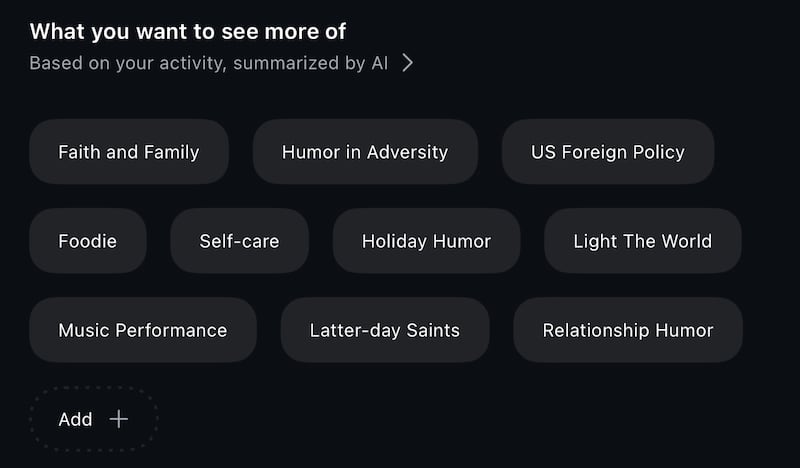
When you’re watching Reels, a new icon in the upper right corner — two lines with hearts on them — opens the “Your Algorithm” panel. Inside, Instagram shows an AI-written summary of what it thinks you’ve “been into lately,” based on your activity. Under that summary is a list of specific topics the app believes you care about. Users can tap to see more or less of certain topics, delete ones they don’t want, or type in new interests they’d like to see more often.
Instagram says recommendations will update in real time as people add or remove topics, and users can even share the interest summary to their Stories — a social-media twist similar to Spotify Wrapped.
The feature is Instagram’s answer to TikTok’s “Manage Topics” setting, which also lets people dial up or down certain themes in their For You page. But while TikTok offers a limited set of broad categories, Instagram’s list is more personalized and allows users to add their own topics, giving finer control over what shows up in the Reels feed.
Meta, Instagram’s parent company, has been under pressure from regulators and parents to make its recommendation systems more transparent and less likely to surface harmful content, especially for teens.
In a video announcing the new feature, Instagram CEO Adam Mosseri said that this new feature will allow users to be able to “see and control” what content they’re seeing.
A tool for cleaner, more values-aligned feeds
For families, people of faith and anyone trying to keep their social media aligned with their values, the feature could offer a practical way to retrain the algorithm rather than simply uninstalling the app or starting over with a new account.
Because users can both remove topics and add new ones, the tool can be used in a few concrete ways:
- Dial down content you don’t want: If your reels feed has drifted toward topics you’d rather avoid — coarse humor, violent clips or other themes that don’t match your standards — those topics can be marked as “less” or removed altogether.
- Boost uplifting content: Users can search and add interests like family activities, scripture study, inspirational music, sermons, service projects or other faith-related topics they want to see more often, then reinforce those choices by watching and interacting with those reels.
- Support media rules at home: Parents who allow Instagram but are trying to maintain family media standards could use the tool alongside existing controls like “Not Interested,” time limits and device-level restrictions to better shape what appears on shared or teen accounts.
Instagram algorithms will still rely heavily on behavior — what people watch all the way through, what they save and what they replay — so “your algorithm” doesn’t erase the need for intentional scrolling. But it does give users a clearer way to say, in effect, “more of this, less of that” in one place.
How to try it
For now, “Your Algorithm” is available in the Reels tab for users in the United States, and Mosseri says that it will roll out to more markets in the coming weeks.
To use it:
- Open the Reels tab in the Instagram app.
- Tap the two-line, two-heart icon in the top right corner.
- Review the summary of what Instagram says you’ve “been into.”
- Scroll through the list of topics and choose which you want more or less of — or add new ones that match the kind of content you want in your feed.