



New features now available on the Gospel Library app of The Church of Jesus Christ of Latter-day Saints are expanding ways members and friends can worship using sacred music.
These new tools — including a new playlist feature — were designed to help Latter-day Saints discover and incorporate sacred music into their daily worship and gospel learning, according to a press release published on ChurchofJesusChrist.org.
Multiple tools were also designed to help members “participate more fully and joyfully in worship,” as church leaders have encouraged.
“Let the singing be transformed,” Elder Patrick Kearon of the church’s Quorum of the Twelve Apostles said in a recent video about enhancing Sunday worship.
“Let us have a tempo that encourages us to sing energetically, (and) let us pray and remember our Savior Jesus Christ.”
Below is a roundup of the new music features on Gospel Library and how to access them. Additional tips and information on how to navigate the app are available here.
Access and create playlists on Gospel Library
Gospel Library users can now access a series of “Featured” playlists by clicking on the home screen icon (located at the bottom left on a phone screen) and scrolling down to “Playlists.”
There, users will find several preexisting playlists with titles such as “Hymns Reimagined” and “Acoustic Hymns.”
By sliding to the right, users will then see options to view all playlists or create their own.
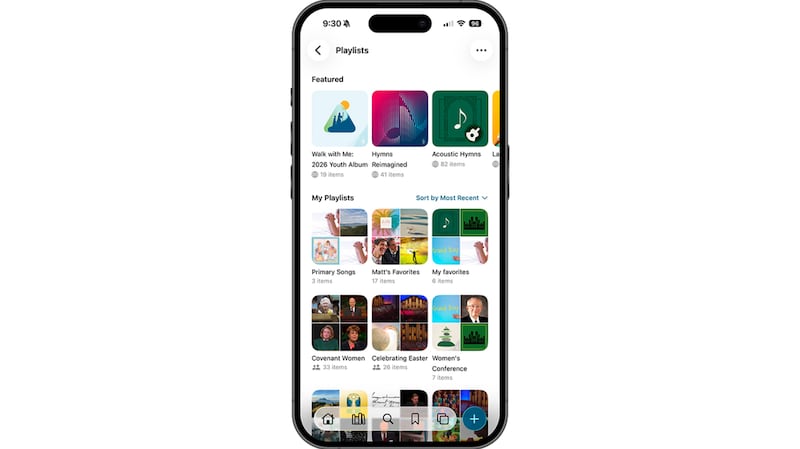
Users may add hymns and other inspiring music to their personal playlists. They may also choose to include general conference addresses, chapters from scripture or other Gospel Library content with audio available.
Search hymns by topic
Users can now find hymns related to specific topics or themes by opening the app’s library screen, selecting “Music” and then selecting “Topics” in the upper-right corner of the screen.
Users wanting to create playlists on specific topics can open individual hymns within a topic, select the three dots in the top-right corner and then select “Add to Playlist.”
Select audio types
When selecting songs to listen to, users will find they are now prompted to select an audio type.
Previously, the app would default to vocal recordings for all music. Now, users have the option to listen to sacred music with:
- Accompaniment only
- Guitar accompaniment
- Vocal recordings
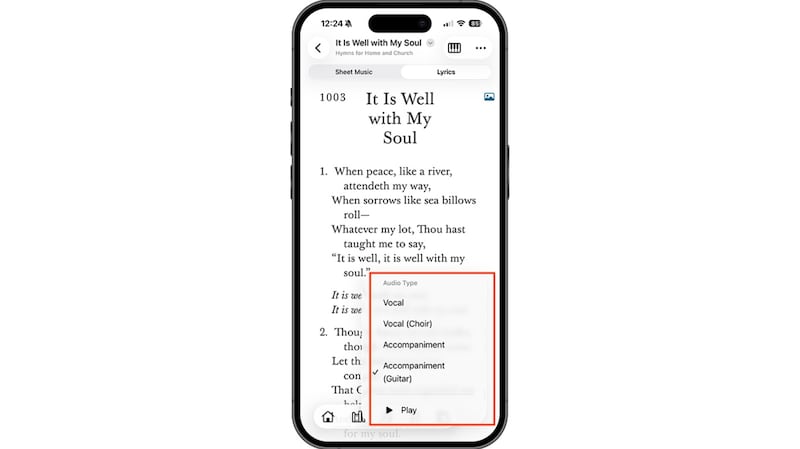
All new songs in the church’s growing hymnbook, “Hymns for Home and Church,” have all audio types available.
Use a virtual hymn board for stake conference
The virtual hymn board tool, which has been available to local church congregations, is now available for use at stake conferences.
Stake presidency members and stake-level music coordinators, executive secretaries and clerks may now program songs for stake conferences using the tool and make programs available to members in advance so they can prepare.
Users must be signed into the app with their church account to access the hymn board feature. A video with more information about the new feature is available here.
Use the metronome tool for ‘joyful’ worship
A new metronome tool is also available for ward music leaders and accompanists to help “keep music at a joyful tempo,” according to a church press release.
To use the tool, ward music leaders and accompanists should reference a hymn’s tempo range (available at the top of a hymn’s sheet music) and then choose a tempo on the metronome that matches the range.
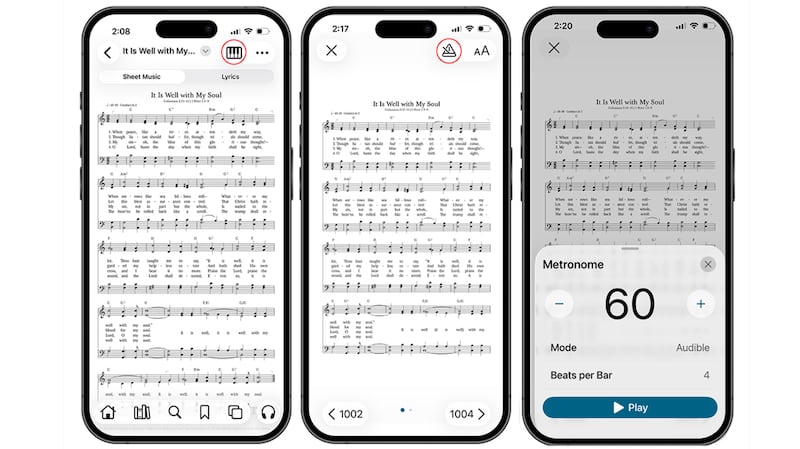
Tempo cues can be set as visible or audible beats. This feature is only available in accompanist mode to users signed into the app with their church account.
Switch guitar chord notation on or off
Guitar chord notation is available for each of the new songs in the church’s collection “Hymns — For Home and Church.”
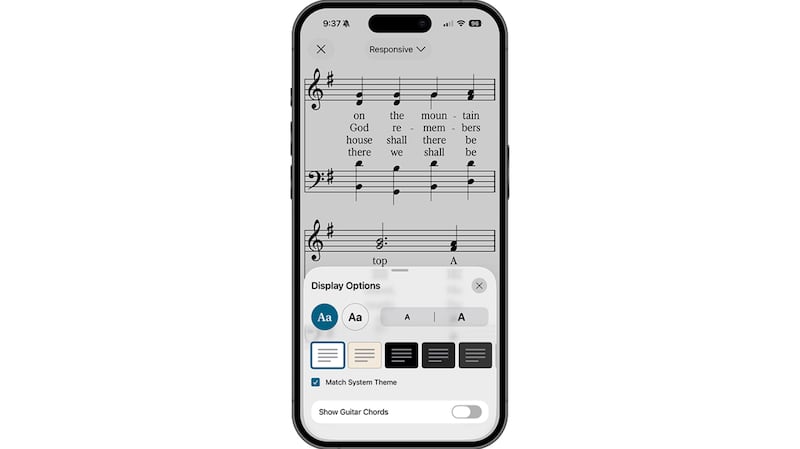
To see chord notations in the sheet music, users must select the top three dots in the top-right corner, select “Display Options” and switch “Show Guitar Chords” on.
Latter-day Saints are encouraged to incorporate sacred music in their daily worship and grow familiar with the church’s growing collection of hymns. The latest batch of hymns released by the church is available here.